


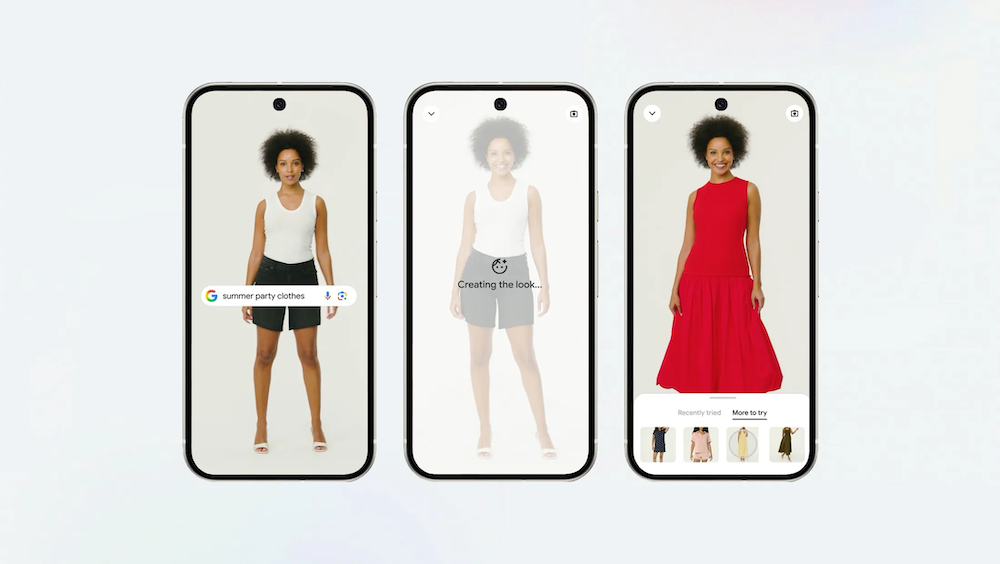
Google is making online clothes shopping more visual with a new tool that allows users see how outfits look on their own body before buying.
Whether it is a cardigan for cooler weather, a summer outfit, or clothes for a job interview, it is often hard to imagine how something will look when shopping online. Google’s new Try On feature aims to solve that by letting shoppers preview clothing on themselves using a photo.
The feature is now expanding to more users and will start rolling out in the Philippines in the coming weeks.
Google said the tool uses a custom image generation model built for fashion. It is designed to understand how clothing fits the human body, including how fabrics fold, stretch, and drape. Instead of showing clothes only on models or flat product images, the system applies the item to a user’s uploaded photo so they can get a more personal view of how it may look in real life.
Try On works across a wide range of items, including tops, bottoms, dresses, and shoes such as sneakers, heels, and sandals. It pulls products from Google Shopping and Search, as well as listings shown in Google Images.
Users can try multiple outfits, compare looks, and save or share their favorites. If they decide to buy something, they can tap a shop button that redirects them to the retailer’s website.
How to use Google Try On
- Open Google Search, Google Shopping, or Google Images
- Tap on an apparel product listing
- Look for and select the “Try it on” icon
- Upload a full-length photo of yourself
- Wait a few moments for the virtual try-on result to load
- View how the clothing looks on your photo
- Try other colors, styles, or items if you want to compare looks
- Save or share your favorite outfits
- Tap the shop button to buy from the retailer’s website
Google said the goal is to make online shopping feel closer to the in-store experience, where fitting rooms help shoppers decide if something is right for them.
