


Close Menu
Philstar Tech
    • Deals
    • Contact Us
    • About Us
    Philstar Tech
    • Home
    • All Post
    • News
      • Features
    • Tech @Life
    • Reviews
      • Fitness
      • Laptops
      • Mobility
      • Smartphones
      • Wearables
    • Opinion
    • Latest Issue
    Philstar Tech
    Home » Google Pay launches in PH; a quick guide to getting started
    News

    Google Pay launches in PH; a quick guide to getting started

    PhilSTAR Tech TeamBy PhilSTAR Tech TeamNovember 18, 20252 Mins Read
    Facebook Twitter Pinterest LinkedIn Tumblr Email
    Share
    Facebook Twitter LinkedIn Pinterest Email

    Google Pay is finally live in the Philippines, allowing Android users to tap their phones at checkout counters as easily as they would a physical card. The rollout brings the country closer to widespread contactless payments, a feature long available in neighboring markets.

    To activate Google Pay, users must first download Google Wallet from the Play Store. The app will serve as the main hub for storing and managing cards used for tap-to-pay transactions.

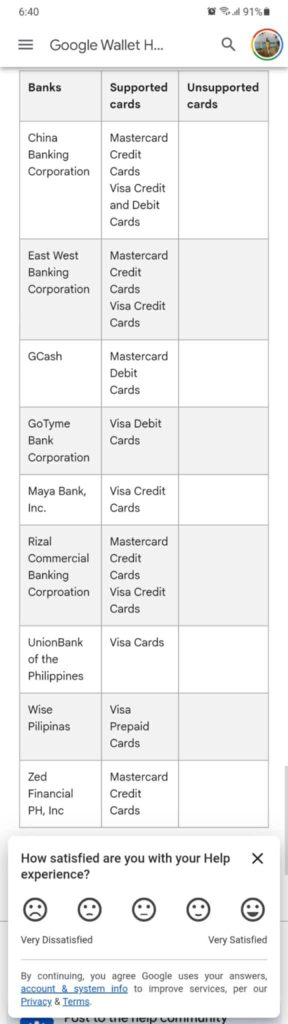
    The next step is to check whether your bank supports Google Pay. Only cards issued by participating banks can be enrolled, and the initial list includes a mix of local and international institutions. More banks are expected to join as the service expands.

    Users can type in their card details or scan the card using the phone’s camera. Banks may require verification through a text message, email, or in-app confirmation before the card becomes available for use.
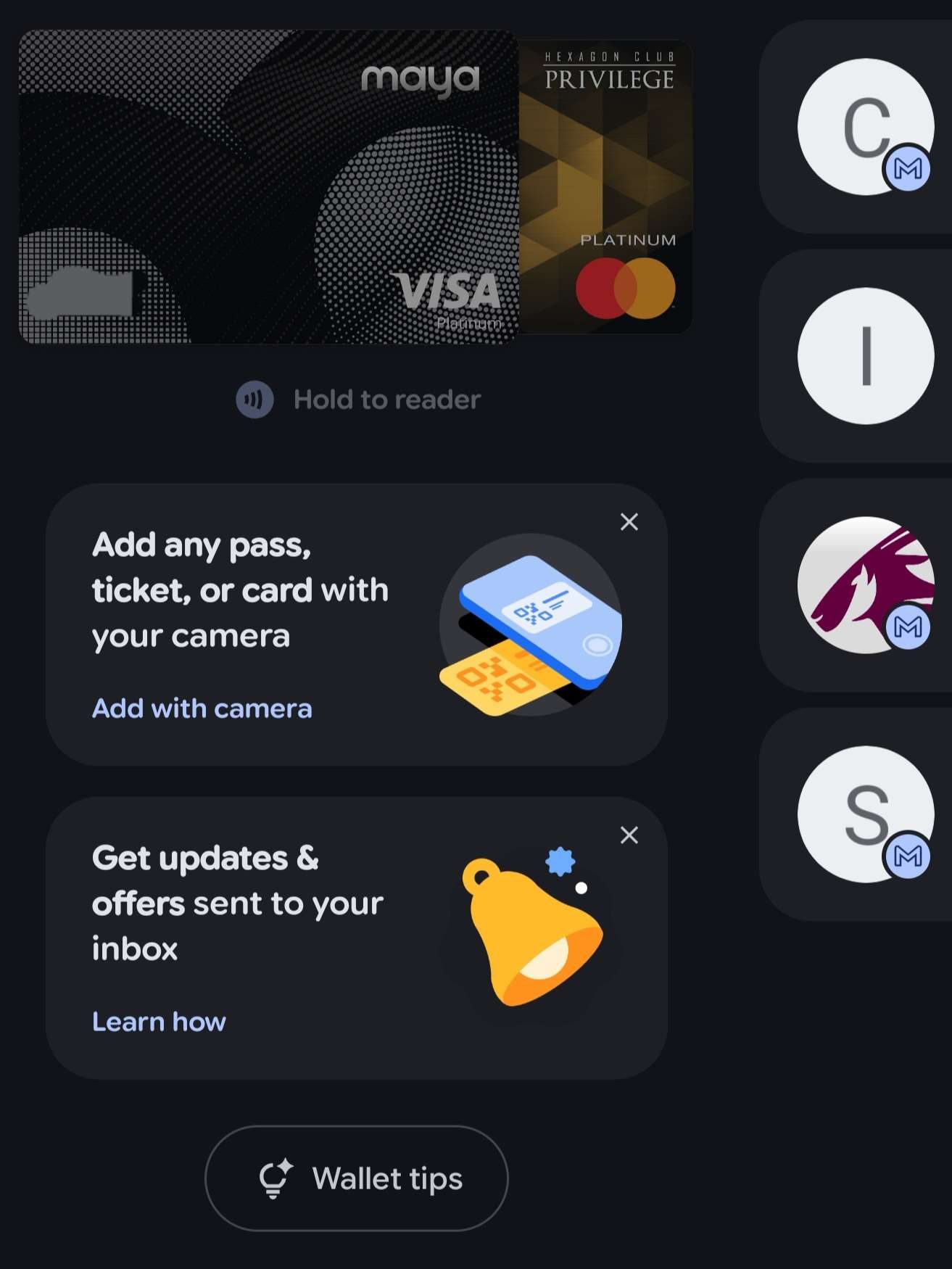
    Multiple cards can be stored on Google Wallet. Users can switch between them by swiping inside the app. Helpful for those who use different cards for groceries or bill payments.

    One thing to keep in mind: the card must not be locked or frozen in the bank’s app. A locked card won’t work with tap-to-pay, even if it appears in Google Wallet.

    Meanwhile, Visa has also announced that its cardholders in the Philippines can now add their Visa debit or credit cards to Google Wallet and use Google Pay for everyday purchases.
    Shoppers only need to unlock their phones and tap the device on a contactless terminal, removing the need to hand over a physical card. All transactions are secured through Visa’s protection systems.

    Google Pay is initially available through seven partner issuers: Chinabank, EastWest Bank, GoTyme Bank, Maya Bank, RCBC, UnionBank, and Wise.

    The Bangko Sentral ng Pilipinas classifies services like Google Pay as technology service providers, meaning they do not store consumer funds but connect directly to Visa credit, debit, or prepaid cards.

    Chinabank EastWest Bank Google Pay Google Play Store Google Wallet GoTyme Maya Bank rcbc UnionBank Visa Wise
    Share. Facebook Twitter Pinterest LinkedIn Tumblr Email
    PhilSTAR Tech Team

    The editorial team of PhilSTAR Tech.

    Related Posts

    Google Chrome upgrade brings Gemini AI tools to PH users

    April 23, 2026

    OpenAI unveils ChatGPT Images 2.0

    April 22, 2026

    Celebrities can now request removal of deepfakes on YouTube

    April 22, 2026

    Most Popular

    Infinix NOTE 60 Pro Review: Finding its place as the first Snapdragon-powered Infinix under ₱20K

    April 21, 20267 Mins Read

    In Dumaguete, a university builds its own tech future

    April 16, 20264 Mins Read

    Here’s where you can officially buy the Nintendo Switch 2 in the Philippines (with 2 years warranty perks to match)

    July 8, 20253 Mins Read

    Infinix to use Snapdragon chips in new phones

    April 18, 20262 Mins Read

    Why LG’s Affectionate Intelligence works in the modern home

    April 18, 20265 Mins Read

    Report: PH ranks among SEA’s most community-driven gaming markets

    April 19, 20262 Mins Read

    Latest

    Google Chrome upgrade brings Gemini AI tools to PH users

    By PhilSTAR Tech TeamApril 23, 20262 Mins Read

    Dyson Spot+Scrub Ai robot vacuum is built for tougher messes

    By Vianca GamboaApril 23, 20264 Mins Read

    OpenAI unveils ChatGPT Images 2.0

    By PhilSTAR Tech TeamApril 22, 20262 Mins Read

    Celebrities can now request removal of deepfakes on YouTube

    By Dawn SolanoApril 22, 20262 Mins Read

    Review: HONOR Pad X8b is a practical tablet for kids and adults alike

    By Marlet SalazarApril 22, 20266 Mins Read

    Study finds 97% in rural Visayas, Mindanao stream TV shows on YouTube

    By Dawn SolanoApril 21, 20262 Mins Read
    Copyright © 2026 Philstar Tech | Powered by The Philippine STAR

    Type above and press Enter to search. Press Esc to cancel.