


Close Menu
Philstar Tech
    • Deals
    • Contact Us
    • About Us
    Philstar Tech
    • Home
    • All Post
    • News
      • Features
    • Tech @Life
    • Reviews
      • Fitness
      • Laptops
      • Mobility
      • Smartphones
      • Wearables
    • Opinion
    • Latest Issue
    Philstar Tech
    Home » iOS 26.3 update allows iPhone users to transfer data to Android devices
    News

    iOS 26.3 update allows iPhone users to transfer data to Android devices

    PhilSTAR Tech TeamBy PhilSTAR Tech TeamFebruary 12, 20262 Mins Read
    Facebook Twitter Pinterest LinkedIn Tumblr Email
    iOS 26.3 update
    Share
    Facebook Twitter LinkedIn Pinterest Email

    Apple released the iOS 26.3 update globally, introducing a new data transfer feature that allows users to move content between iPhones and Android devices. Like most updates, it also focuses on bug fixes and security updates.

    The feature enables smartphone users who need to move their data (and that include apps, contacts, messages, and photos) can now do so without downloading any other app.

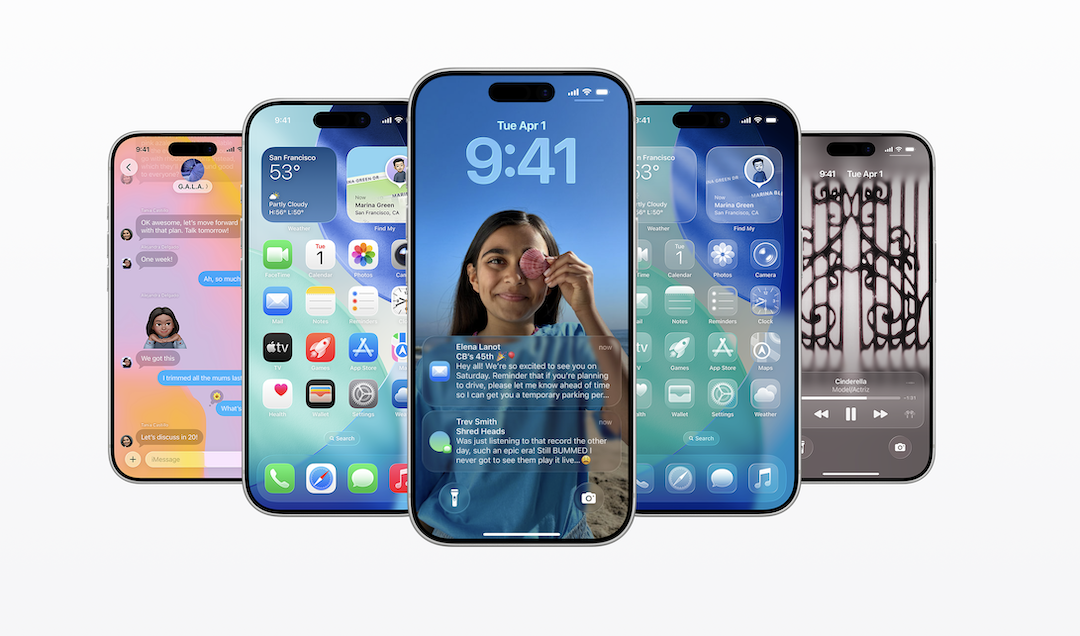
    The update also includes a redesigned interface called Liquid Glass, which changes the visual appearance of the Lock Screen, Home Screen, Control Center, and native apps. The design uses transparent, glass-like elements to create a more uniform look across Apple devices.

    The update expands the integration of Apple Intelligence, Apple’s artificial intelligence (AI) system. The AI features support language translation during conversations, help generate personalized images, and provide task assistance across apps.

    The Lock Screen now adjusts the clock display and notifications based on the user’s wallpaper. The system keeps the main subject of a photo visible while notifications appear around it. The update also adds a motion-based effect that creates a three-dimensional view when users move their device.

    Apple also refreshed app icons, giving users options to switch between updated light and dark modes, color-tinted icons, and a transparent design style. 

    The Liquid Glass interface is designed to make navigation across Apple devices easier, particularly for users who switch between multiple Apple products throughout the day.

    ai Artificial intelligence iOS 26.3 iOS 26.3 update iphone Transfer to Android
    Share. Facebook Twitter Pinterest LinkedIn Tumblr Email
    PhilSTAR Tech Team

    The editorial team of PhilSTAR Tech.

    Related Posts

    HONOR teams up with ARRI to bring cinema-grade imaging to phones

    March 16, 2026

    Health app mWell wins global mobile award for emergency innovation

    March 16, 2026

    How solar power can help power your home

    March 14, 2026

    Most Popular

    Google Maps update brings immersive AI navigation

    March 13, 20262 Mins Read

    Here’s where you can officially buy the Nintendo Switch 2 in the Philippines (with 2 years warranty perks to match)

    July 8, 20253 Mins Read

    BSP urges banks to replace OTPs with stronger security methods

    March 11, 20263 Mins Read

    Xiaomi 17 Review: My first Leica phone experience

    March 12, 20265 Mins Read

    Review: How ‘Resident Evil: Requiem’ stuck the landing

    March 13, 20264 Mins Read

    AWS: PH organizations move to next phase of AI adoption

    March 6, 20262 Mins Read

    Latest

    Health app mWell wins global mobile award for emergency innovation

    By PhilSTAR Tech TeamMarch 16, 20263 Mins Read

    LG InstaView refrigerators, top load washers add smart home features

    By PhilSTAR Tech TeamMarch 16, 20262 Mins Read

    HONOR teams up with ARRI to bring cinema-grade imaging to phones

    By PhilSTAR Tech TeamMarch 16, 20262 Mins Read

    Infinix NOTE Edge blends style and power for always-online days

    By PhilSTAR Tech TeamMarch 14, 20262 Mins Read

    How solar power can help power your home

    By PhilSTAR Tech TeamMarch 14, 20263 Mins Read

    Google Maps update brings immersive AI navigation

    By Marlet SalazarMarch 13, 20262 Mins Read
    Copyright © 2026 Philstar Tech | Powered by The Philippine STAR

    Type above and press Enter to search. Press Esc to cancel.