


Ready to upgrade your PC build?
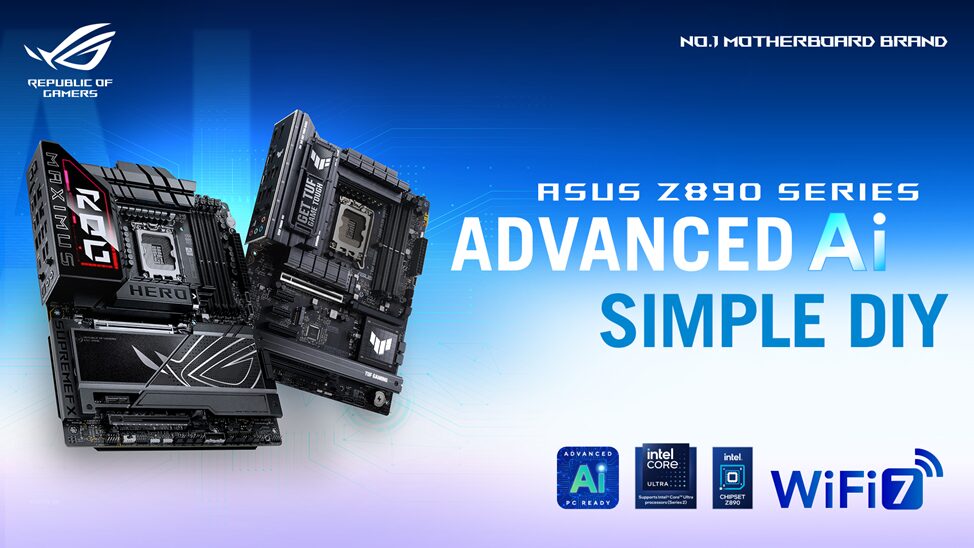
ASUS just unveiled an exciting lineup of Z890 motherboards designed for Intel® Core™ Ultra processors (Series 2). These boards combine top-notch performance, AI-powered tools, and user-friendly designs to make the most out of your setup, whether you’re a gamer, creator, or PC enthusiast.
What’s New and Noteworthy
- Optimized for Intel Core Ultra Processors: These boards are built for Intel’s LGA 1851 socket, bringing out the best in Intel’s newest processors.
- One-Click AI Tools: Boost your system effortlessly with AI Overclocking, AI Cooling II, and AI Networking II – all designed to optimize your setup with just one click.
- Enhanced Memory and Connectivity: Enjoy cutting-edge DDR5 memory, boosted NPU performance for AI, and fast connections with Thunderbolt™ 5 and WiFi 7.
- Simplified Build Process: ASUS Q-Design features like the Q-Release Slim, M.2 Q-Latch, and Q-Dashboard make installation and customization a breeze.
Intel Core Ultra Support and Next-Gen Features
With the LGA 1851 socket, Intel’s Series 2 processors bring faster speeds and smarter performance, perfect for AI tasks. ASUS Z890 boards take this up a notch with NPU Boost for smoother AI-powered applications and Intel Xe graphics that support high-res displays without needing a dedicated graphics card.
Each motherboard in the Z890 lineup offers enhanced connectivity, with plenty of USB options, high-speed networking, and more M.2 slots to make your rig flexible and future-ready.
AI-Powered PCs Just Got Smarter
ASUS has infused AI into every part of these motherboards, from AI Overclocking for faster speeds to AI Cooling II for quieter, more efficient cooling. Plus, the ASUS AI Advisor provides helpful tips and explanations for users of all experience levels, making it easier to navigate and make the most out of your setup.
New and Improved Memory Options
Looking for the latest memory tech? The Z890 lineup brings NitroPath DRAM Technology and AEMP III profiles, making it easier to overclock and optimize DDR5 modules. Whether you’re using the latest CUDIMM memory for faster speeds or expanding with traditional UDIMM memory, these boards are ready to support your setup.
Seamless DIY Experience
Building your PC is simpler with ASUS Z890 boards. A clearer BIOS interface, intuitive Q-Design features, and easy-to-use memory slots take the hassle out of the process. With Thunderbolt 5 (supporting up to 120 Gbps!) and Wi-Fi 7, you’re set up for future-proof performance and connectivity.
For those looking for a premium build, the ROG Maximus Z890 Extreme boasts sleek black and charcoal tones, an 8-layer PCB, and impressive cooling, while the ROG Strix Z890-E Gaming WiFi shines with enhanced M.2 storage and eye-catching RGB lighting.
ASUS’s New Motherboards, Available Now
From the powerhouse ROG Maximus to the versatile ProArt and TUF Gaming boards, ASUS’s Z890 series has something for every type of builder.
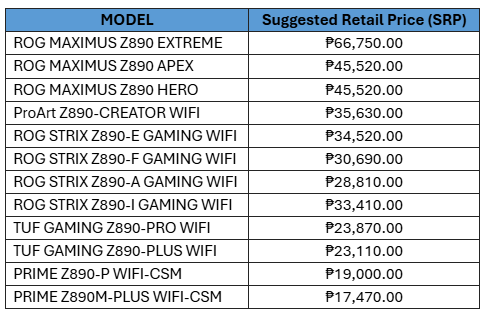
Visit the ASUS PC DIY portal for build ideas and check out the full ASUS Z890 lineup for a PC that meets your needs and exceeds your expectations.
Exclusive Promo for ASUS Z890 Motherboards
As a special treat, ASUS is offering limited-edition ROG merchandise with the purchase of any ASUS Z890 motherboard! The promo runs from October 24 to November 15, 2024, so don’t miss out. Visit this link for more details and to claim your gear.
