



BSS, the subunit of the renowned South Korean boy band SEVENTEEN as well as the newest OPPO Reno Experts, have sprung into action to showcase the capabilities of OPPO’s newly rolled out AI Eraser.


The free-to-use tool was recently rolled out to its OPPO Reno11 Series, which includes the OPPO Reno11 Pro, OPPO Reno11, and OPPO Reno11 F. It allows OPPO Reno11 Series users to easily remove objects from photos by circling them.
As a dynamic and youthful boy group who revel in self-expression, BSS (SEVENTEEN) members SEUNGKWAN, DK and HOSHI continuously create content and capture candid moments on the go. There are times, however, when a precious moment captured contains an unwanted object or background that would otherwise have resulted in the perfect shot, such as the group picture (above) with an unwanted light stand in the background.
With AI Eraser, this can easily be fixed in a flash. All they did was simply circle the unwanted light stand, and the OPPO Reno11 Series’ generative AI intelligently removed it, generating natural-looking content to fill the space. The result is the perfect composition that exactly matched their vision.
AI Eraser for the OPPO Reno11 Series is capable of accurately recognizing objects from over 120 categories, including people, pets, trees, buildings, and flowers. It uses advanced generative AI to allow for class-leading, seamless edits to remove objects in the best way possible, creating natural-looking photos as a result.
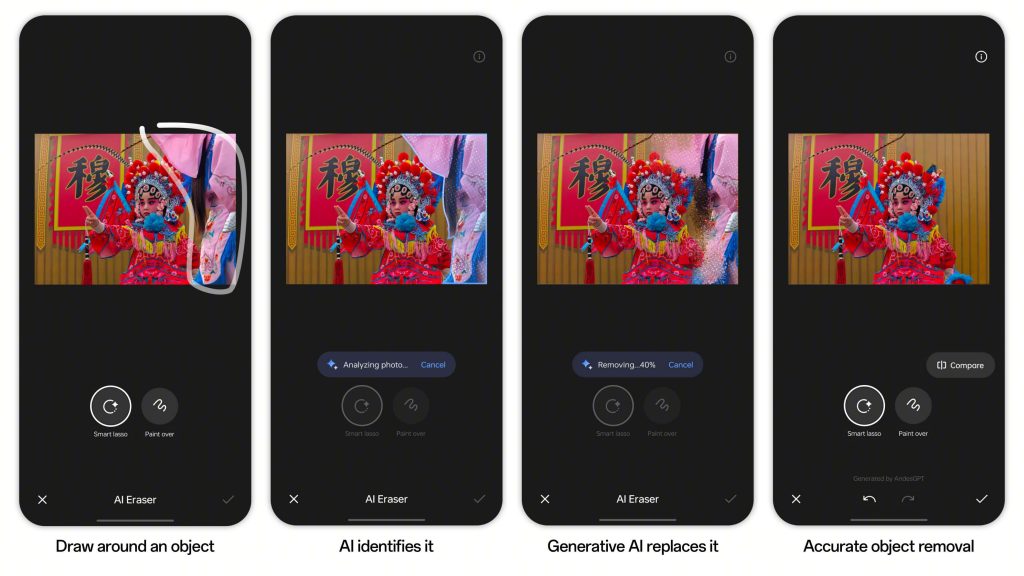
AI Eraser is easy and convenient to use. Here’s a step-by-step guide:
STEP 1: Find a picture that is almost perfect
STEP 2: Tap Edit, followed by AI Eraser
STEP 3: Use Smart Lasso to draw around object, or use Paint Over to draw over an object
STEP 4: Watch the object disappear before your eyes as AI Eraser uses generative AI to intelligently fill in the blanks, so you can enjoy your perfect picture
More AI Eraser features
Smart Lasso and Paint Over are two available features under AI Eraser. Smart Lasso allows users to easily encircle unwanted subjects, making it a highly recommended feature for users who struggle with precision drawing or circling.
Paint Over serves as a valuable complement to Smart Lasso, particularly when an object in the image contains an area that users would prefer not to remove. Both features come with a slider option to adjust the stroke size for even more precise object removal.
While many external smartphones within the OPPO Reno11 Series’ price range offer object removal tools, they tend to produce results that appear noticeably edited, creating unnatural-looking elements.
“Reno11 Series is the first smartphone line at its price to feature such advanced generative AI image editing, and demonstrates OPPO’s commitment to enrich everyday experiences through technology for everyone,” said Leon Wang, Director of Reno Series Product Planning Development.
Reno11 Series users in Phiippines can experience AI Eraser via an OTA update.
For more information about the OPPO Reno11 Series and AI Eraser, please visit OPPO visit https://www.oppo.com/ph/ or check out OPPO Philippines’ official social media pages on Facebook, YouTube, and TikTok.
