



Do you always tap “Allow” when an app requests for permission to your phone? Think twice!
The use of mobile apps has become an integral part of our daily lives. Undeniably, these apps are helpful particularly when we talk about communication, entertainment, studies, and a lot more. However, the convenience and utility of mobile apps often come at the cost of our personal data privacy. Do you take time reading the “privacy policy” before using the app, or you just blindly accept it every time?
In our country, we have the Data Privacy Act (DPA) of 2012 that aims to protect the personal information of individuals and ensure that data privacy is respected by organizations such as tech companies that collect and process such information.
Let’s explore when not to “accept” privacy policies with “red flags” and how the DPA can guide you in making informed decisions.
An Overview in the Data Privacy Act
The DPA places an emphasis on the rights of data subjects (individuals whose personal data is collected) and sets out the obligations of data controllers (organizations that collect and process personal data).
The DPA requires organizations to obtain clear and informed consent from data subjects before collecting their personal information. Consent should be freely given, specific, and informed. This means you should fully understand what you are agreeing to when accepting a privacy policy.
Personal data can only be processed for the specific purposes for which it was collected. Mobile apps should clearly state their data collection purposes, and they shouldn’t use your data for unrelated activities.
Data controllers are also required to implement security measures to protect personal data even when sharing your personal information to third parties.
“Red Flags” in Privacy Policies
The following instances are the “red flags” in Privacy Policies, or the warning signs which may help you protect your digital privacy.
- Requesting, collecting, and sharing unnecessary information
Some mobile apps may request access to a wide range of personal information, some of which may not be relevant to their primary function.
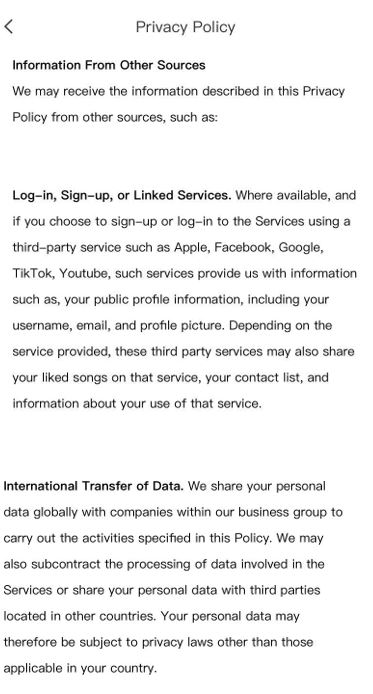
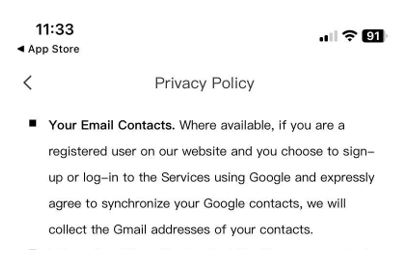
Let’s take the Privacy Policy of a trending video editing app as an example. Its Privacy Policy states that when you login to the app using your Google account and expressly agree to synchronize your contacts, it will collect the Gmail addresses of your contacts without specifying the reason why. What is the relevance of your contact list in their primary function of “editing videos”? Think twice.
Not only that, the Policy expressly provides that the third party services you link in the editing app may share your contact list to another parties. Imagine the number of entities that can access your contact list. Moreover, they share your personal data with third parties located in other countries! Now, if you use multiple mobile apps with similar policies, don’t be surprised if you, your family members or friends get a phone call from a strange phone number coming from other countries, or receive emails from companies you never engaged with.
- Unnecessary access to your camera
If a mobile app’s Privacy Policy indicates that it gains access to your camera, especially if this access is unrelated to its primary function, run! In such cases, it’s best to uninstall the app. For instance, if a seemingly innocent calendar app requests camera access, be cautious, as it may observe your daily personal activities without your awareness.
- Frequent Changes to Policies
You have the right to be notified of changes to Privacy Policies. Although it is not inherently problematic for apps to often update their privacy policies, if an app expressly states that they may frequently change its privacy policy without notifying users, it can be a sign that the app is not taking your privacy seriously.
- Lack of Security Information
A privacy policy should describe how your data is secured and protected. If an app’s Privacy Policy is silent on this matter, it’s wise not to accept it.
- No Consent Options
The DPA requires that you give informed consent. If an app doesn’t offer you the choice to accept or decline data collection, then it may not be respecting your rights.
Learn to protect your personal data. We have the DPA which may serve as our guide in understanding our rights and the obligations of organizations. Remember, when it comes to privacy policies, “accept” should be a well-informed choice, not a reflex.
